Many people assume that sitting comfortably simply means finding a position that feels good in the moment. If nothing hurts right away, the setup must be fine. In reality, this is one of the main reasons sitting-related discomfort develops over time.
Comfortable sitting is not about holding a perfect posture or following rigid rules. It is about how well your body is supported while sitting for long periods, how much effort your muscles need to maintain that position, and how easily you can move and adjust as time passes.
This overview explains what “comfortable sitting” actually means from an ergonomic perspective and why understanding this concept is essential before adjusting your chair, desk, or monitor.
Why “comfortable sitting” is often misunderstood
One of the biggest misunderstandings about sitting comfort is the difference between short-term comfort and long-term support.
A sitting position can feel comfortable for several minutes while quietly placing strain on muscles and joints. This is especially common when:
- Muscles are actively holding you upright instead of being supported
- Joints are held at the edge of their comfortable range
- Your body is compensating for poor support without obvious warning signs
Discomfort usually does not appear immediately. It builds gradually as muscles fatigue and small stresses accumulate. By the time pain or stiffness is noticeable, the underlying issue has often been present for hours or days.
What ergonomics really means when sitting
Ergonomics is often mistaken for “sitting straight” or forcing the body into a specific posture. In practice, ergonomics is about reducing unnecessary effort.
When sitting ergonomically:
- Your chair supports your body instead of your muscles doing all the work
- Your joints rest in natural, neutral positions
- You are not constantly holding yourself in place
Good sitting ergonomics allows your body to relax into the position rather than brace against it. The goal is not to look upright, but to feel supported with minimal muscular tension.
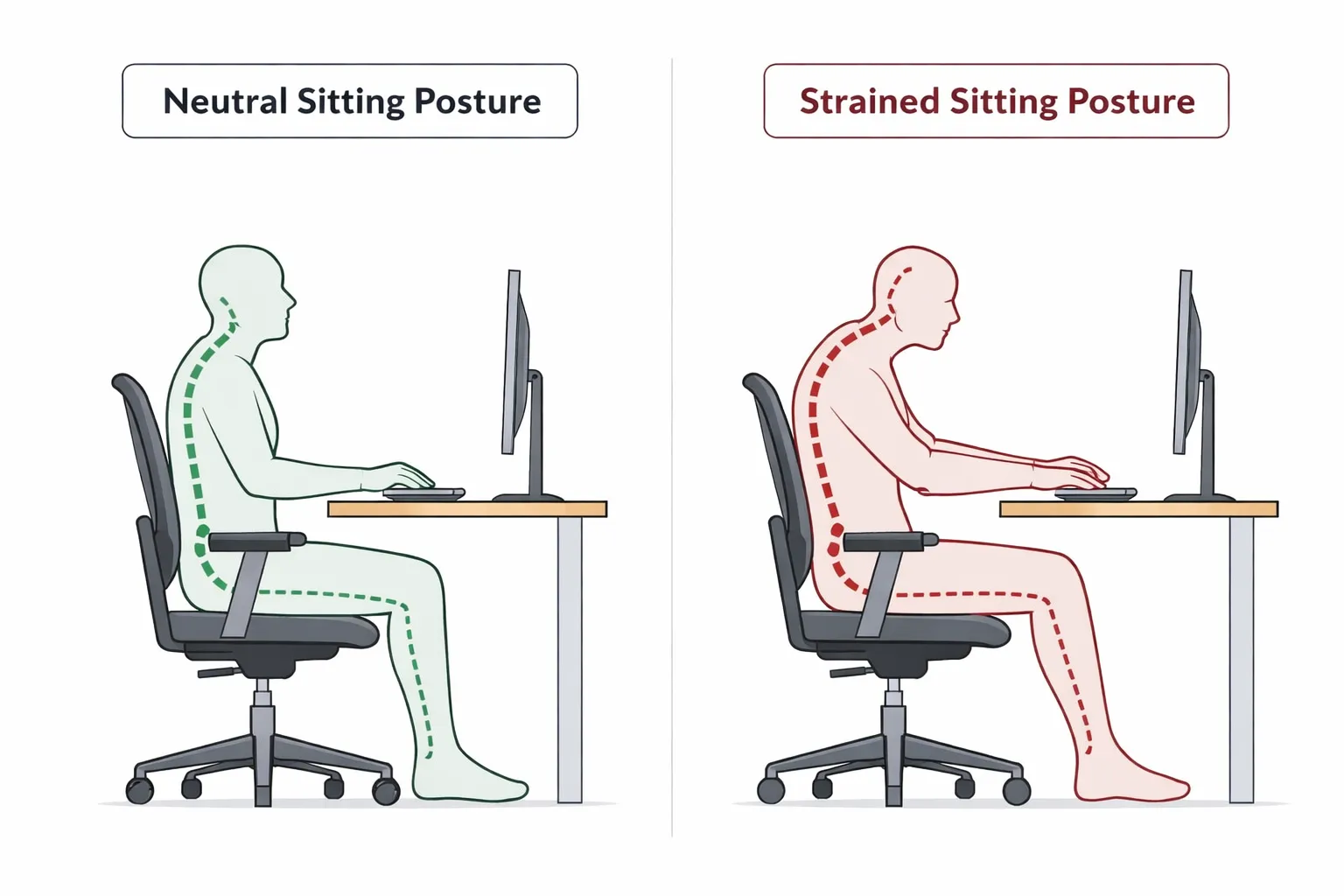
Neutral sitting posture without rigidity
Neutral sitting posture is often described as an ideal position, but it is frequently misunderstood as something you must hold perfectly at all times.
In reality, neutral posture means:
- Your spine maintains its natural curves rather than being flattened or exaggerated
- Your shoulders rest naturally instead of being pulled back or raised
- Your arms can hang comfortably without strain
- Your hips, knees, and feet are positioned so your weight is evenly supported
Neutral posture is a range, not a single fixed pose. Small variations are normal and healthy. The problem arises when your setup forces you to sit outside this neutral range for extended periods.
Why static sitting causes problems
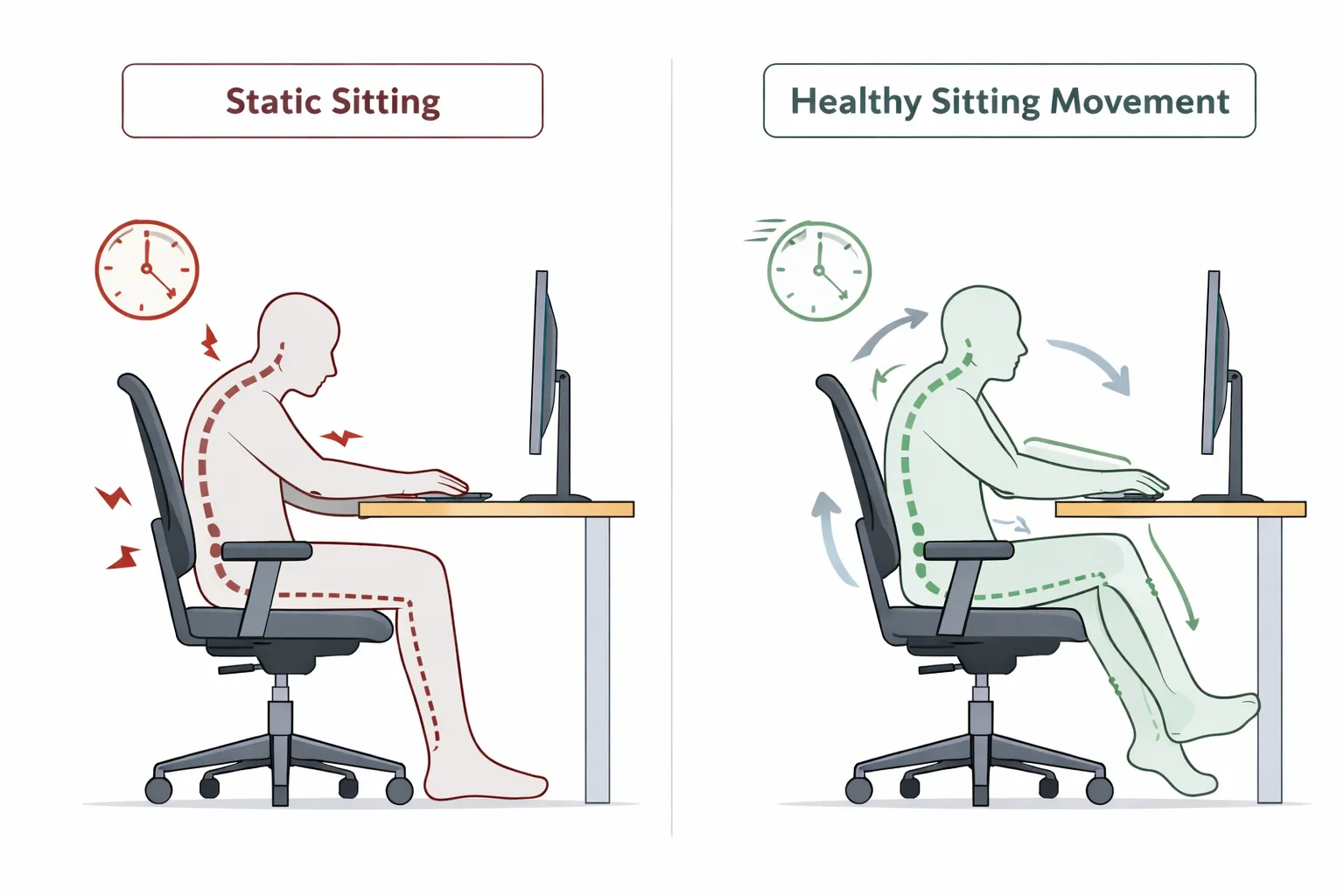
Even a well-supported sitting position becomes uncomfortable if it is held too long.
Human bodies are designed for movement, not stillness. Static sitting leads to:
- Muscle fatigue as the same muscles stay engaged
- Reduced circulation
- Increased joint stiffness
- Gradual posture collapse as your body searches for relief
Healthy sitting includes small, frequent adjustments. Shifting your weight, changing leg position, or subtly repositioning your arms are all normal and beneficial. Ergonomics should support movement, not prevent it.
How discomfort develops over time
Sitting-related discomfort usually develops in stages:
- Muscles begin to work harder to maintain position
- Fatigue sets in, often without immediate pain
- Posture slowly changes as the body compensates
- Strain accumulates in specific areas such as the neck, shoulders, lower back, or wrists
Because this process is gradual, it is easy to miss early warning signs. Ergonomic sitting focuses on preventing this buildup rather than reacting after discomfort appears.
How this applies to your workstation
Comfortable sitting does not depend on a single adjustment. It emerges from how your workstation elements work together.
At a high level:
- Chair height affects how your legs, hips, and lower back are supported
- Desk height influences shoulder position and arm effort
- Monitor height and distance affect neck posture and visual strain
- Keyboard and mouse placement determine how relaxed your arms and wrists can be
Each of these elements influences the others. Adjusting one without considering the rest often leads to new problems instead of solving existing ones.
What to focus on next
Understanding what comfortable sitting really means is the first step. The next step is applying these principles to your own setup.
Rather than chasing a perfect posture, focus on:
- Support instead of muscle effort
- Neutral ranges instead of rigid positions
- Movement instead of stillness
From here, you can explore how to adjust specific parts of your workstation using these principles as a foundation: