Desk height is one of the most overlooked parts of a comfortable sitting setup. Many people focus on chairs or monitors while assuming the desk itself is “fixed” and therefore out of their control. In reality, desk height plays a major role in how your shoulders, arms, and wrists feel throughout the day.
This guide explains how to set up desk height for comfortable sitting using simple, body-based guidelines. It focuses on practical adjustments you can make, even if your desk isn’t adjustable, and shows how desk height fits into the rest of your workstation.
Why desk height matters more than people think
When desk height is wrong, your body compensates automatically. A desk that’s too high encourages raised shoulders and bent wrists. A desk that’s too low often leads to slouching or leaning forward. These compensations may feel subtle at first, but over time they can contribute to fatigue, tension, and discomfort in the neck, shoulders, and arms.
Unlike short tasks, long periods of desk work leave little room for poor alignment. Even small mismatches between desk height and your natural sitting posture become more noticeable the longer you remain seated. Getting desk height right helps reduce unnecessary strain and allows your upper body to stay more relaxed during work.
What “correct desk height” actually means
There is no single desk height that works for everyone. Body proportions, chair height, and the type of work you do all influence what feels comfortable. Instead of focusing on a specific measurement, it’s more useful to think in terms of relative position.
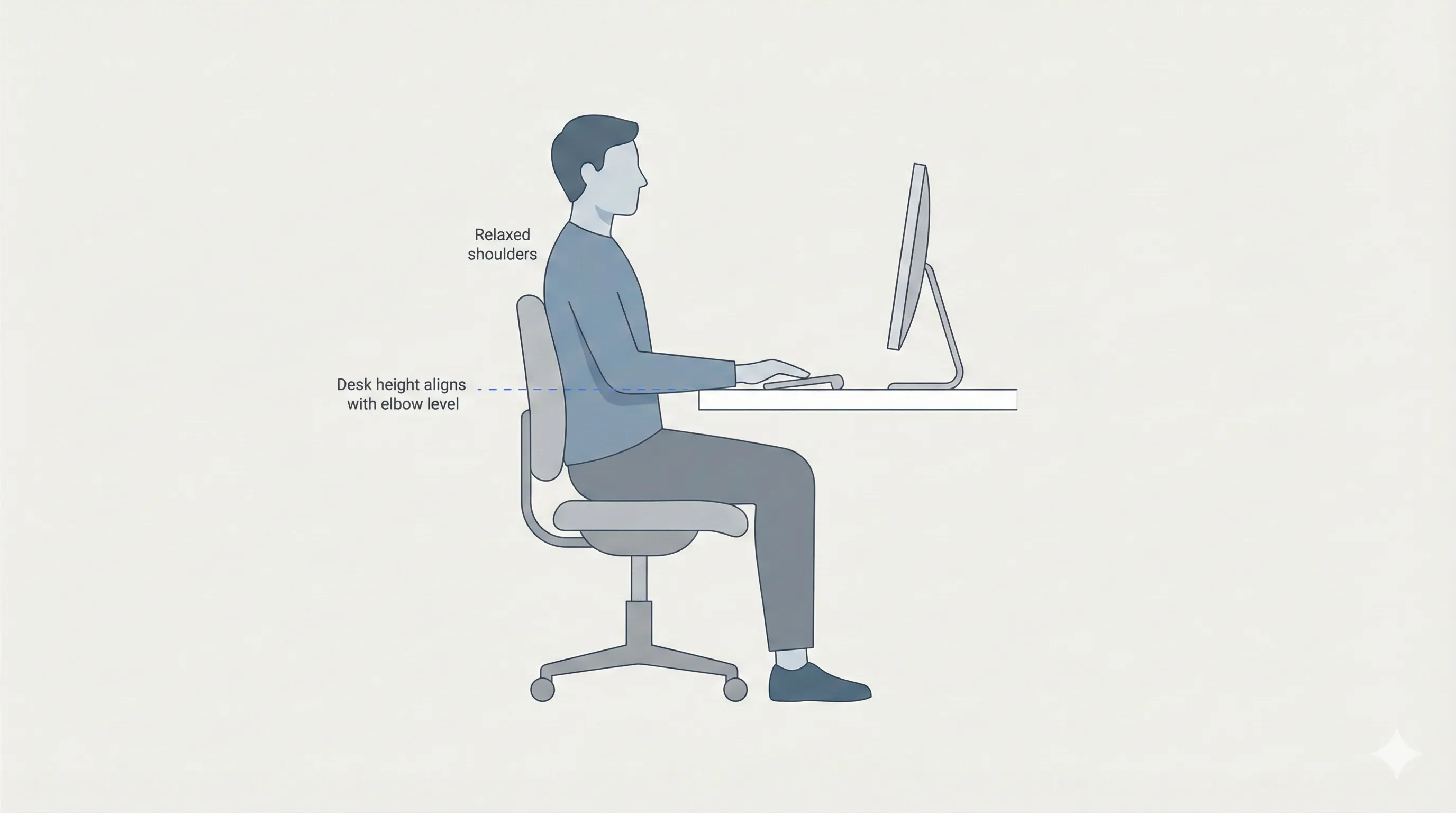
A good starting point is your elbow height when seated. When you sit comfortably with your shoulders relaxed and your upper arms resting naturally at your sides, your elbows form a reference point. Ideally, the desk surface should sit close to this level, allowing your forearms to rest without lifting your shoulders or bending your wrists sharply.
Correct desk height supports:
- Relaxed shoulders, not shrugged upward
- Forearms roughly parallel to the floor
- Wrists that stay mostly neutral during typing or mouse use
How to set desk height step by step
Setting desk height works best when you approach it as part of a sequence rather than an isolated adjustment.
Start with chair height
Begin by setting your chair height to a comfortable height. Your feet should rest flat on the floor, and your thighs should be supported without pressure behind the knees. This establishes a stable base before adjusting anything else.
Once your chair height feels right, avoid changing it again unless necessary. Desk height should be adjusted relative to your seated position, not the other way around.
Adjust the desk relative to your elbows
With your chair set, sit upright and let your arms hang naturally at your sides. Bend your elbows to about a right angle, keeping your shoulders relaxed. The desk surface should be close to this elbow height.
If the desk is adjustable, raise or lower it until your forearms can rest comfortably on the surface without forcing your shoulders up or pulling them downward.
If you notice tension in your shoulders while typing, the desk is likely too high. If you feel yourself leaning forward or resting weight on your forearms, the desk may be too low.
Check wrist and shoulder comfort
Once the desk height is set, spend a few minutes typing or using your keyboard and mouse. Pay attention to how your wrists and shoulders feel rather than how the setup looks.
Wrists should stay mostly straight, not bent sharply up or down. Shoulders should feel relaxed, not lifted or pulled forward. Small adjustments can make a noticeable difference, so don’t hesitate to fine-tune the height slightly.
If your desk isn’t adjustable
Many people work at desks that cannot be raised or lowered. While this limits your options, it doesn’t mean comfort is out of reach.
One approach is to adjust your chair height to better match the desk. Raising the chair can help if the desk is too high, but this often creates a new problem: your feet may no longer rest comfortably on the floor. In this case, a footrest can help support your feet while maintaining proper leg position.
If the desk is too low, lowering the chair may bring your arms closer to desk height, but this can affect leg comfort and back support. In these situations, it’s important to decide which elements are non-negotiable. Foot support and back support from your ergonomic office chair should not be sacrificed just to match desk height.
The goal is to find the least compromising solution rather than a perfect one.
Common desk height mistakes
One of the most common mistakes is working at a desk that’s too high. This often leads to raised shoulders and wrist strain, especially during typing. Another frequent issue is setting the desk too low, which encourages slouching or leaning forward for support.
People also tend to compensate for poor desk height by adjusting their wrists, elbows, or shoulders instead of addressing the desk itself. These compensations can feel manageable in the short term but often lead to discomfort over longer sessions.
Recognizing these patterns early makes it easier to correct them before they become habits.
How desk height connects to the rest of your setup
Desk height doesn’t exist in isolation. It works together with your chair, armrests, and monitor position to create an overall sitting posture.
If your desk height is correct but your armrests are too high or too low, you may still feel shoulder tension. If your desk and chair are well aligned but your monitor height is positioned too low or too high, you may compensate by leaning or craning your neck.
Thinking about desk height as one part of a connected system makes it easier to identify what needs adjustment when discomfort appears.
Final thoughts
Setting up desk height for comfortable sitting is less about finding a perfect measurement and more about supporting natural posture. Starting with your chair, aligning the desk with your elbows, and paying attention to how your body feels are more reliable than following rigid rules.
Even small improvements in desk height can reduce strain and make long hours of sitting feel noticeably easier. Once desk height is working for you, it becomes much easier to fine-tune the rest of your workstation for comfort and productivity.